Ubuntu After Install



Automated installation a lot of usefulextra software on Ubuntu after the initial desktop install.
This program installs a collection of some of the best Ubuntu software and can be considered to be one of the top things to do after installing Ubuntu.
Selecting and Installing all the extra software on a new Ubuntu computer can be time consuming. I wanted to automate the process on new machines as well as simplify the installation for new users. All comments and improvements are very welcome as this is purely a personal project at this point and must be considered a work in progress.
The application will install the latest versions of all software listed below as well asadd the required PPA’s to keep the software up to date.
Extra Software Installed:
Ubuntu Restricted Extras video codecs and Flash Plugin |
libdvdcss to enable DVD playback |
MyUnity / Unity Tweak Tool (Depending on Ubuntu version) |
Faenza Icon Theme |
| Variety |
| XScreenSaver |
My Weather Indicator |
Calendar Indicator |
Google Chrome |
LibreOffice |
| Skype |
| Grive Tools |
| DropBox |
| VLC |
| XBMC |
| GIMP |
| Darktable |
| Inkscape |
| Scribus |
| Samba |
PDF Tools |
| FileZilla |
| OpenShot |
| Kdenlive |
| Handbrake |
| Audacity |
| Steam |
| KeePassX |
| Shutter |
| p7zip |
For more information on these programs visit the software selection page.
Installation:
- Download the Ubuntu After Install application (download links at bottom of page)
- Double click on the downloaded .deb file to Install the application using the Ubuntu Software Center or manually with dpkg -i from the command line.
- Search Ubuntu Dash for Ubuntu After install and start the application.
- Follow the on-screen instructions (see screenshots below)
Requirements:
- Ubuntu 12.04 or later Desktop installed.
- NOTE : With newer releases of Ubuntu some of the items might not be available yet and will not be installed. You can install these items later when newer versions are released.
Using Ubuntu After Install
- Start the application from the dash by searching for Ubuntu After Install.
- Follow the on screen instructions.


- Select the software you would like to install and click Install Now to begin.

- Once you have started the install process be very patient as the installation will take a while to complete.
- Once an application has been installed successfully it will be marked with green dotas shown below.
- If there is a problem with the install of an application, or if it is not available for your version of Ubuntu it will be marked with a red dot.
- It is not a good idea to stop or interrupt the install process once it has begun.
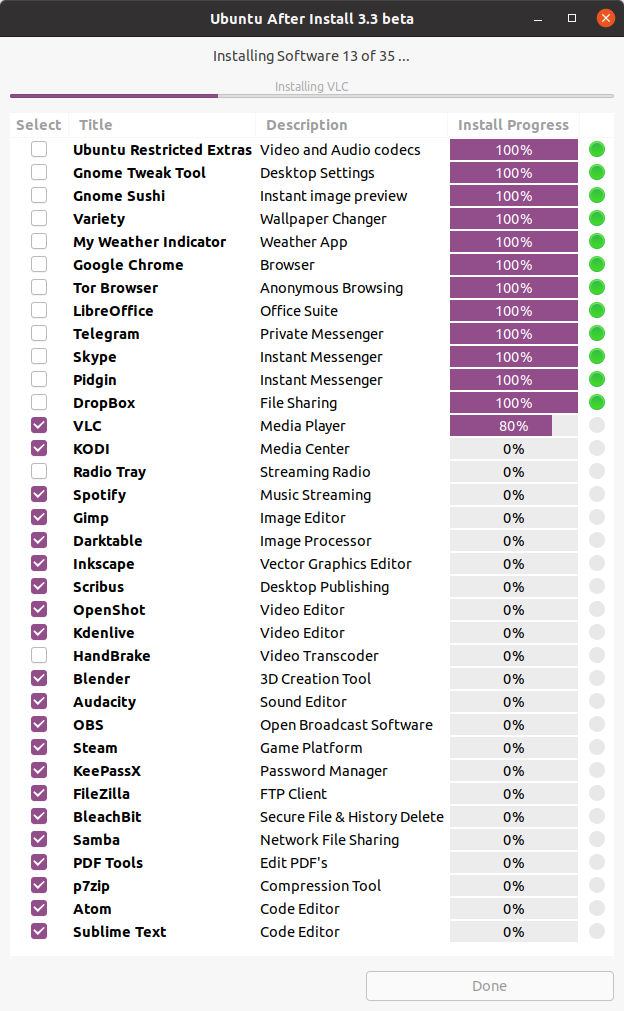
- Software that has already been installed will not be selected by default, but you can select these items to re-install or upgrade the software to the latest versions.
- Software marked with an orange dot will be re-installed / upgraded.

Download:
| Attachment | Size |
|---|---|
 | 28.37 KB |
Соль жизни в том, что она не сахар!


